

For typical workloads in most applications, a regular CPU suffices. Occasionally, we might enhance performance by adding more CPUs or adjusting memory configurations to align with specific workloads—some of which are CPU-intensive, while others are memory-intensive. Our underlying operating system is fortified from a security standpoint, equipped with monitoring agents.
However, the AI landscape introduces a paradigm shift. AI workloads demand distinct processing power, necessitating additional drivers and libraries. Let’s delve into the differences between CPU, GPU, and TPUs to better understand their roles in this evolving scenario. From last March 2024 Groq LPU(Language Processing Units) is heavily coming in discussion and I thought it does deserve a separate section not necessarily a verbose post but a decent size one.
Hopefully by end of this artical we will have answers to some of the below headings
Commencing the AI Workload Discussion: We’ll begin by understanding the type of compute required when running AI workloads.
Exploring GPU and TPU Popularity in AI: By the end of this topic, we’ll address why GPUs and TPUs are more popular in the context of AI. Additionally, we’ll delve into how they enhance computation power for your AI model, whether you’re using it in offline or online mode.
Comparing TPUs and GPUs: We’ll explore the differences between TPUs and GPUs. Furthermore, I’ll guide you on ensuring that your workload runs on the appropriate hardware—whether it’s a GPU or TPU—from a programming perspective.
Central Processing Units (CPUs) play a crucial role in handling various workloads. They operate in a serialized manner, meaning they execute instructions one after the other rather than in parallel. CPUs consist of multiple cores, each acting as an independent processing unit. These cores allow for concurrent execution of tasks, enhancing overall performance.
Initially, CPUs had a single core, but over time, more cores were added. The latest models from Intel and AMD boast up to 26 cores. These cores are connected to memory via a high-speed bus. When a CPU performs calculations, it loads values from memory, processes them, and stores the results back in memory. However, memory access is slower compared to the CPU’s calculation speed, which can impact the overall throughput of the system.
GPUs(Graphical Processing Unit)
GPUs consist of multiple cores, often including multiple ALUs (Arithmetic Logic Units).
- While GPU manufacturers typically do not disclose the exact number of ALUs, both NVIDIA and AMD reveal this information in terms of the total number of cores.
TPUs (Tensor Processing Units):
- Google designed Cloud TPUs specifically as matrix processors optimized for neural network workloads.
- TPUs cannot handle tasks like word processing, rocket engine control, or banking transactions. However, they excel at performing massive matrix operations required by neural networks.
- To execute matrix operations:
- The TPU loads parameters from HBM (High Bandwidth Memory) into the Matrix Multiplication Unit (MXU).
- Data is streamed into an infeed queue.
- The TPU processes data from the infeed queue and stores it in HBM memory.
- After computation, the TPU loads results into the outfeed queue.
- Finally, the TPU host reads the results from the outfeed queue and stores them in the host’s memory.
LPU(Language Processing Units): The architecture implemented here predominantly involves Tensor Streaming processes, finely tuned for Tensorflow-related workloads. Workloads are executed sequentially, following Groq’s assertion, the owner of this product, that approximately 60% of components on a standard CPU remain unused for AI/ML tasks. This portion of the chip is minimized, while additional Arithmetic Logic Units (ALUs) are integrated, and the control unit orchestrates operations sequentially, resulting in a throughput nearing 80 TB/s.

Why Aren’t Google TPUs as Popular as NVIDIA GPUs or Others?:
- Google TPUs are not widely available for commercial use outside the Google Cloud platform.
- In contrast, GPUs were initially accessible for graphical and gaming purposes.
- The popularity of GPUs increased due to their versatility, especially for machine learning workloads involving image or video data.
- Additionally, the availability of CUDA libraries facilitated running machine learning tasks on GPUs.
- While TPUs excel in neural network processing, their limited availability and focus on cloud usage contribute to their lower visibility compared to NVIDIA GPUs and other alternatives.
Is it truly faster, and can we evaluate its performance?
Let’s focus on a high-level understanding without delving into intricate program details, which we’ll explore later in the series.
The context involves neural networks and their processing. Specifically, we’re dealing with a multi-layered MNIST dataset using TensorFlow. During training, the data passes through three different layers over ten epochs. Additionally, there’s data format conversion within the process. There are total number of 692352 parameters on which it is trained. It achieves accuracy of 98.67%.Below is the description for the training model.

I’ve created a model and tested it using two distinct datasets: one from IMDB (as mentioned earlier) and another on MNIST just to test the hypothesis. In upcoming sections, we’ll dive into each aspect of the training model.
For experimentation, I conducted these tests both locally(as I have GPU on my laptop) and on Colabnet. To ensure priority access to GPUs and TPUs, I subscribed to a paid service of Colabnet.
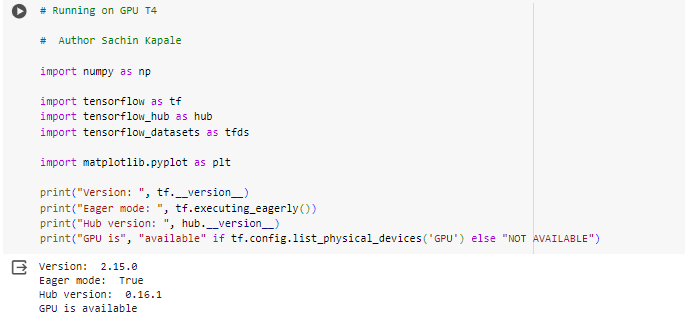
Checking GPU Availability:
- To determine if a GPU is available, we can use Python libraries.
Checking TPU Availability:
- TPUs (Tensor Processing Units) are accessible primarily within the Google Cloud environment.
- Once you subscribe to Google Cloud, TPUs become available to you. Here I am using Colabnet.

For GPUs, libraries like CUDA are commonly used.
- To compare performance, I have maintained the same workload while ensuring access to both GPU and TPU programmatically.
- Keep in mind that TPUs are specifically designed for certain types of workloads, including:
- Models dominated by matrix computations.
- Models without custom TensorFlow/PyTorch/JAX operations inside the main training loop.
- Models that train for extended periods (weeks or months) with large effective batch sizes.
What was the result when I executed it?
On CPU
The download, train and evaluation of model took close to 7 min and 8 seconds.


On GPU
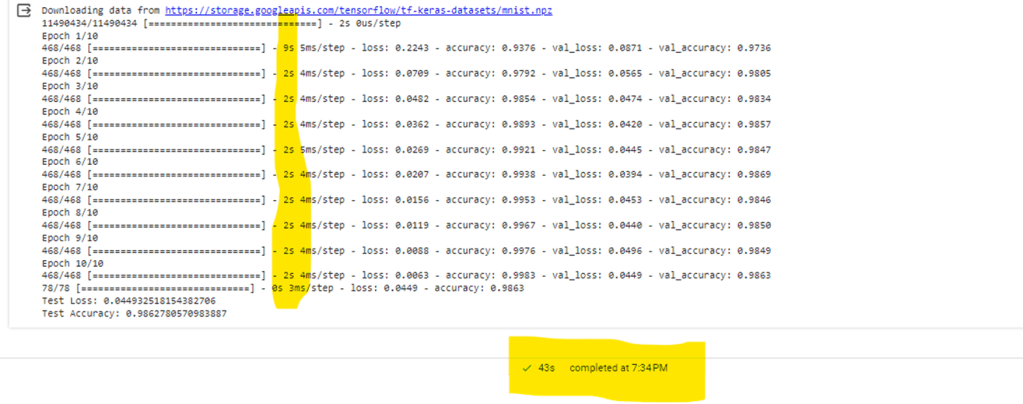
After verifying GPU availability and switching my runtime in Colab, I followed similar steps to train and evaluate the model with minor adjustments to enable GPU access. The entire process took approximately 43 seconds.

On TPU
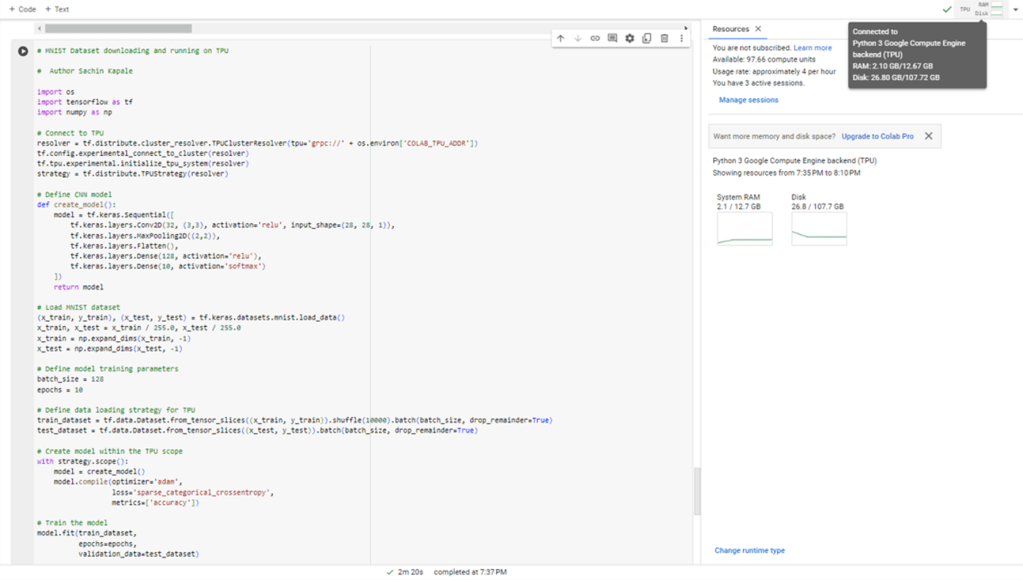
While third time I tried on a TPU after connecting with TPU runtime. It took close to 2 min and 20 seconds.

On LPU
Groq opened there playground cloud platform for everyone and I could get my hands dirty but I haven’t integrated or ran some of my own models but I ran a simple search on llam3 8B version and I could find it took close to 1.78 second to throw close 890 tokens, which is impressive but stay tuned for more updates when I will make progress on deploying an running particular model. Below is the stats on a simple query on NLP in Groq cloud.

Conclusion
I believe there’s no need to write a conclusion, given the following observations: the CPU took 7 minutes and 8 seconds, the GPU completed the task in 44 seconds, and the TPU finished in 2 minutes and 20 seconds. Most CNN models involve matrix-level calculations, and the GPU is specifically optimized for such computations, ensuring faster performance for tasks like screen rendering and gaming. Its design prioritizes high-speed memory access and efficient matrix transactions, which also benefit CNN operations. While the TPU may achieve similar speeds as the GPU, it’s essential to note that TPUs perform better for extended periods like weeks and months with specific number of batches and we will find out more in future. The outcomes on the LPU appear encouraging, potentially addressing the NLP challenge associated with interface lag when aiming for real-time interactions with AI agents or robots. These LPUs could offer a seamless experience. However, whether they will supplant NVIDIA remains uncertain, only time will reveal.

 Sachin Kapale